Provide Donna access to SAP C4C V1 to enhance meeting insights and automatically push notes and activities to your CRM.
This guide walks you through:
Creating the required users in SAP C4C V1
Assigning the correct permissions
Connecting SAP C4C V1 to Donna
Verifying the integration
Before you begin, make sure you have:
Admin access to your SAP C4C V1 tenant
A sandbox environment (recommended for initial setup)
Permission to create users and assign roles in SAP C4C
For sandbox environments, we recommend creating two users:
Frontend user (recommended)
Used for UI access, validation, and troubleshooting
Can be a standard SAP C4C user with appropriate CRM permissions
Integration (technical) user (required)
Used by Donna to access SAP APIs
This user’s credentials will be entered in Donna
Should be a dedicated, non-human user
For production environments, typically only the integration (technical) user is required.
Best practice
Always use a dedicated integration user for Donna. This makes auditing, permission management, and credential rotation safer and easier.
Ensure the integration user has access to the required SAP C4C V1 entities.
AppointmentCollection
BusinessUserCollection
ContactCollection
CorporateAccountCollection
OpportunityCollection
OpportunitySalesCyclePhaseCodeCollection
TasksCollection
VisitCollection
ProductCollection
LeadCollection
Please ensure read access is granted to all of the above, and write access where appropriate (based on business needs).
Once the integration user is ready, connect SAP to Donna.
In Donna:
Go to Settings → Integrations
Select SAP C4C V1
Enter the following details:
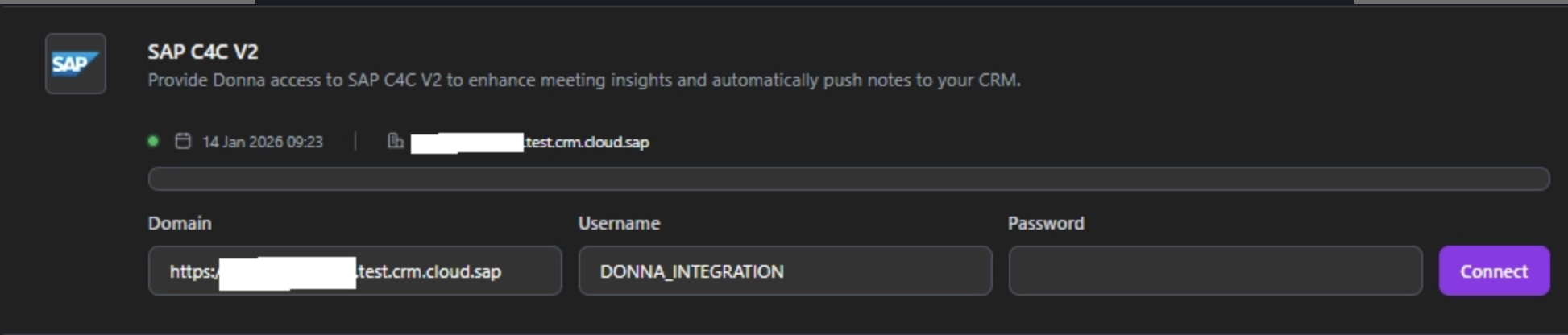
SAP C4C tenant URL
Username (integration user)
Password (integration user’s password)
Click Connect
Donna will immediately attempt to authenticate and validate access.
Once configuration is complete:
Test the setup in your sandbox environment.
When confirmed working, allocate time and resources to move the setup to production.
If a temporary frontend user was used, you may deactivate it after onboarding is finalized.