Integrating Donna with Outlook Mail allows users to draft emails in Donna and automatically save them as draft emails in Outlook. If the integration is not set up, users can still draft emails in Donna. However, they will need to either click a link to open the draft in Outlook or manually copy the draft email into Outlook.
To set up the Outlook Mail integration, each individual user must login to Donna and connect to Outlook. To do this, open a web browser and go to https://app.askdonna.com
Login with Google, Microsoft or magic sign in link (If you did not yet receive an invite to Donna, please request an invitation from a colleague who did).
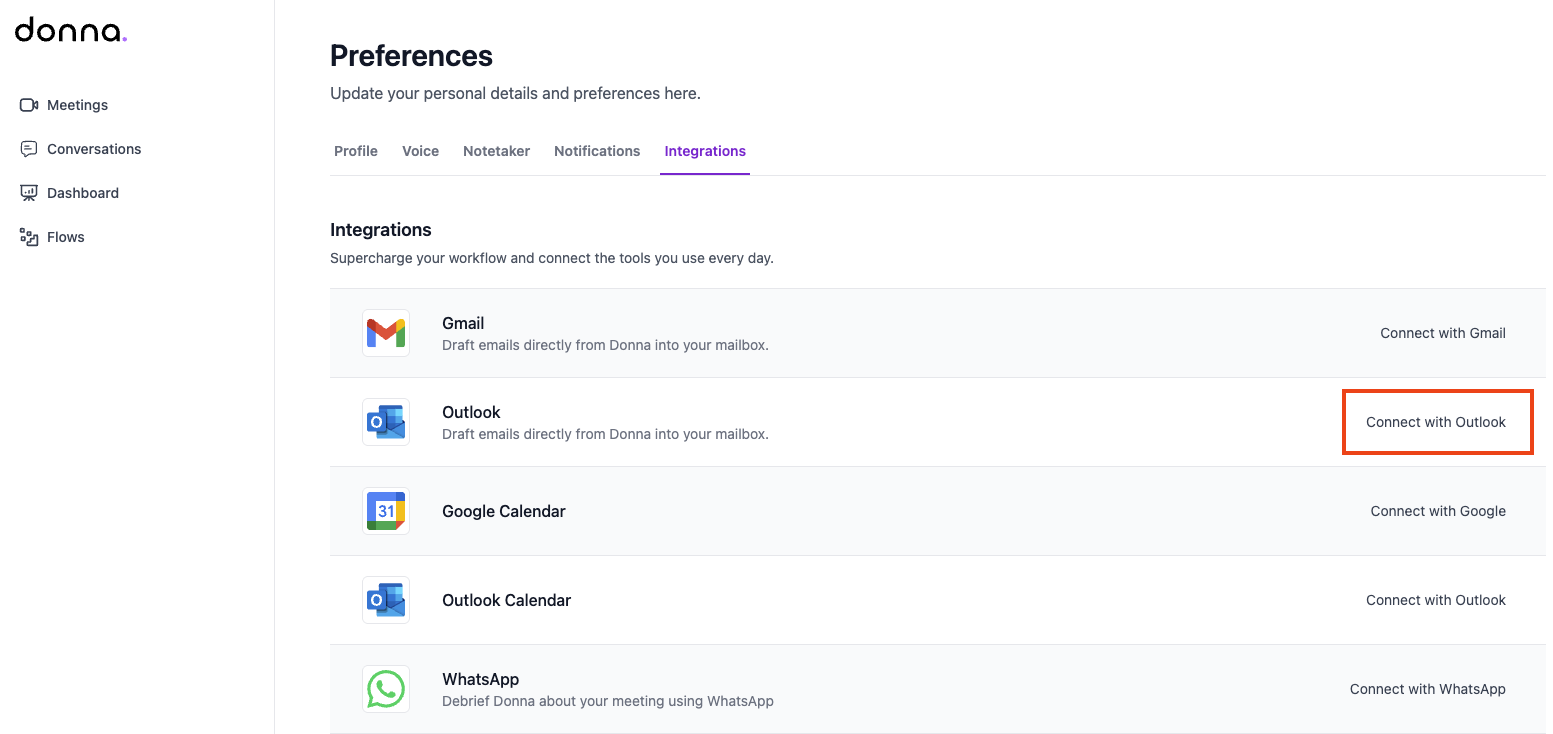
Once logged in, click on your name in the bottom-left corner, then click on Preferences and then on Integrations. On the Integrations page, click on Connect with Outlook.
Depending on your organization’s Microsoft settings, you may be redirected to a page where you can either grant consent yourself, request admin consent, or where only an administrator is permitted to request and approve consent.
If admin consent is required, you will see a message indicating that approval from your Microsoft administrator is needed. In this case, enter a justification and click Request approval.
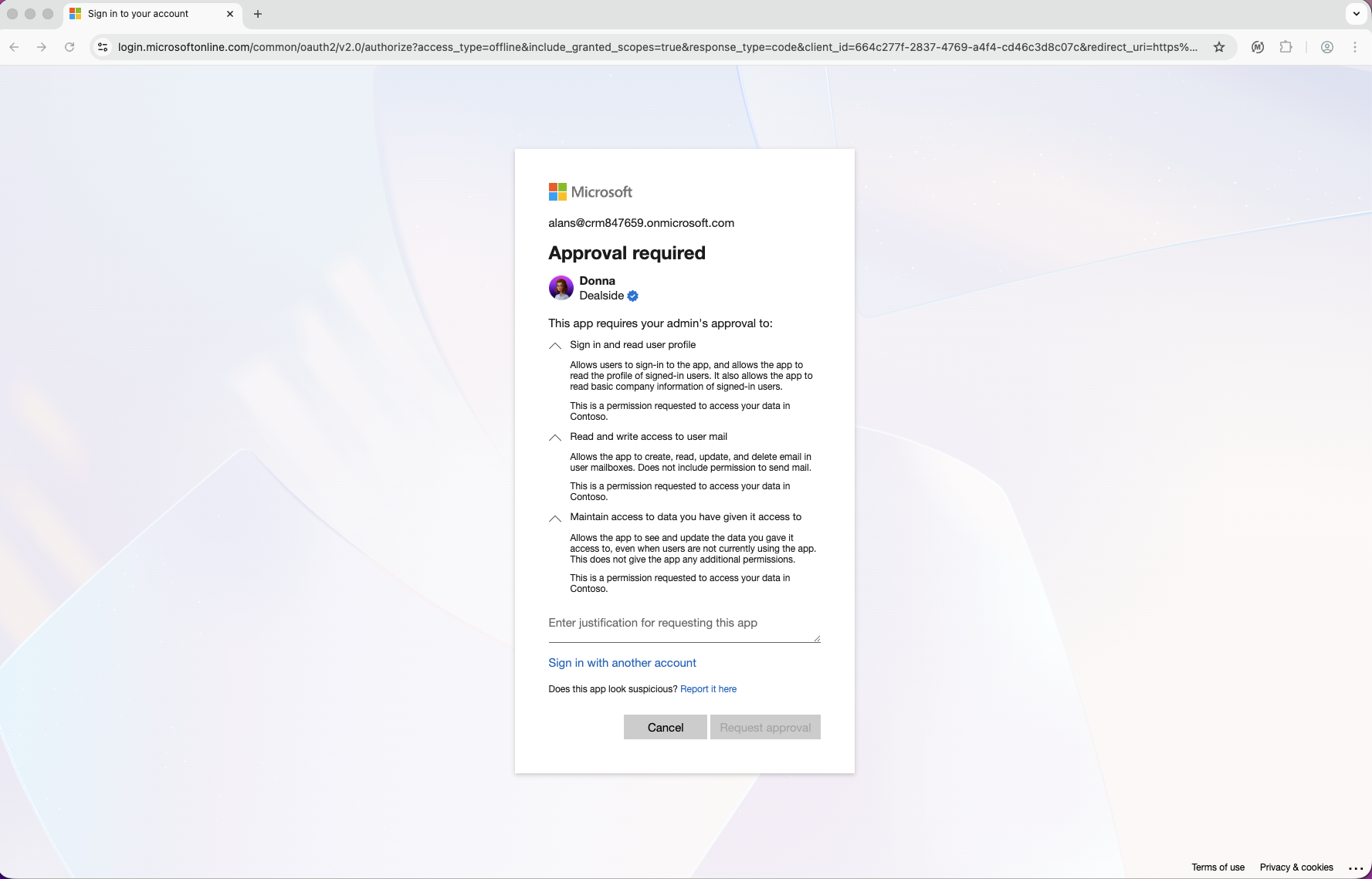
Your request will be sent to your Microsoft administrator for review. You must wait until the administrator grants consent before the integration can be completed.
In some organizations, only an administrator can both request and approve consent. If this applies to you, please contact and invite your Microsoft administrator to Donna and ask them to set up the integration first.
You will not be able to connect Outlook until admin approval has been provided. Once consent is granted, you need to connect again starting from the Integrations page in Donna.
In some organizations, users are allowed to grant consent individually. If this applies to you, then review the requested permissions. Click Accept to grant consent. Once approved, you will be automatically redirected back to Donna, and the Outlook integration will be connected.
The Outlook Mail integration is a Microsoft integration that creates a Microsoft Enterprise Application named Donna in Microsoft Entra ID.
This Enterprise Application is used for all Donna Microsoft integrations, including:
Microsoft OAuth login
Outlook Calendar integration
Outlook Mail integration
Microsoft Dynamics integration
The Donna Enterprise Application is automatically created the first time a user logs in to Donna using their Microsoft account or configures a Microsoft integration. It cannot be manually created.
Although there is only one Donna Enterprise Application in Microsoft Entra ID, the permissions granted to it depend on the integrations that are configured. Each integration requests its own specific set of permissions.
The following permissions are required for the Outlook Mail integration:
openid
profile
User.Read
Mail.ReadWrite
offline_access
Although the Mail.ReadWrite permission allows access to read a user’s email, Donna does not read users’ emails. Microsoft does not provide a separate permission specifically for creating draft emails. As a result, Donna must request the Mail.ReadWrite permission in order to prepare a draft email in Outlook.
To view the Donna Enterprise Application, a Microsoft administrator can go to https://portal.azure.com, navigate to Microsoft Entra ID, select Enterprise applications, and search for and open the application named Donna.
If no Enterprise Application named Donna is listed, this means that no user in the Microsoft tenant has yet logged in to Donna using Microsoft OAuth or configured a Microsoft integration.
Depending on your Microsoft Entra ID consent and permission settings, users may be able to grant consent themselves or may require administrator approval.
If administrator consent is required, the consent process must first be initiated by a user attempting to log in with Microsoft or configure a Microsoft integration. When this happens, the user will automatically see a screen where they can submit a request for approval. In some organizations, users are not allowed to request administrator consent. In that case, a Microsoft administrator must initiate the consent process.
An administrator can then review and approve the request, which grants the requested permissions for that specific integration at the tenant level.
Administrator consent must be initiated through a login or integration attempt. Permissions cannot be granted in advance without an initial consent request.
Even though there is only one Donna Enterprise Application, Microsoft login and each Microsoft integration requires its own administrator approval the first time it is configured, as login and different integrations may request different permissions. Once administrator consent has been granted for login or a specific integration, subsequent users in the tenant will be able to login and set up that integration without needing to request approval again.
In addition to managing consent and permissions, administrators can also control which users are allowed to sign in to Donna with their Microsoft account and configure Outlook integrations.
To do this, navigate to the Donna Enterprise Application, then go to Manage, Properties. The “Assignment required?” setting determines access. When set to Yes, only users who have been added under Users and groups can sign in to Donna using Microsoft and set up Outlook integrations.